
Screenshots
App details
- Updated
- Mar 24, 2025
- Language
- English
- Developer
- alexc wrt
- Category
- Mobile
SoftPas in:
This product is also available in the following languages:
About Windows Repair Toolbox
Download Windows Repair Toolbox – repair, system, tools, utility, fix, optimize, performance, Windows, computer, troubleshoot
Overview
Windows Repair Toolbox is a utility application designed to assist users in resolving minor system failures on Windows-based computers. The app provides a centralized platform for troubleshooting and optimizing system performance, making it a practical tool for both casual users and those with moderate technical knowledge. Its primary purpose is to address common issues such as software conflicts, corrupted system files, and performance degradation through a suite of built-in repair functions.
By offering a range of tools for system maintenance, Windows Repair Toolbox aims to simplify the process of keeping a Windows PC running smoothly. It is particularly useful for individuals who may not have advanced technical skills but still need to maintain their system's health. The app targets users seeking a reliable, free solution to common computer problems without the need for third-party software or complex command-line operations.
The developer, Windows Repair Toolbox, has positioned the application as a comprehensive yet accessible tool for system repair and optimization. Although no additional background about the developer is provided, the app's functionality and focus on user-friendly solutions suggest a clear intent to serve the general Windows user base. Real-world use cases include fixing startup issues, resolving software installation errors, and improving overall system responsiveness.
Within the broader ecosystem of system utility tools, Windows Repair Toolbox fills a niche by combining multiple repair functions into a single, easy-to-access interface. Its presence underscores the ongoing demand for efficient, lightweight, and secure utilities that empower users to maintain their devices independently.
Key Features & Functionality
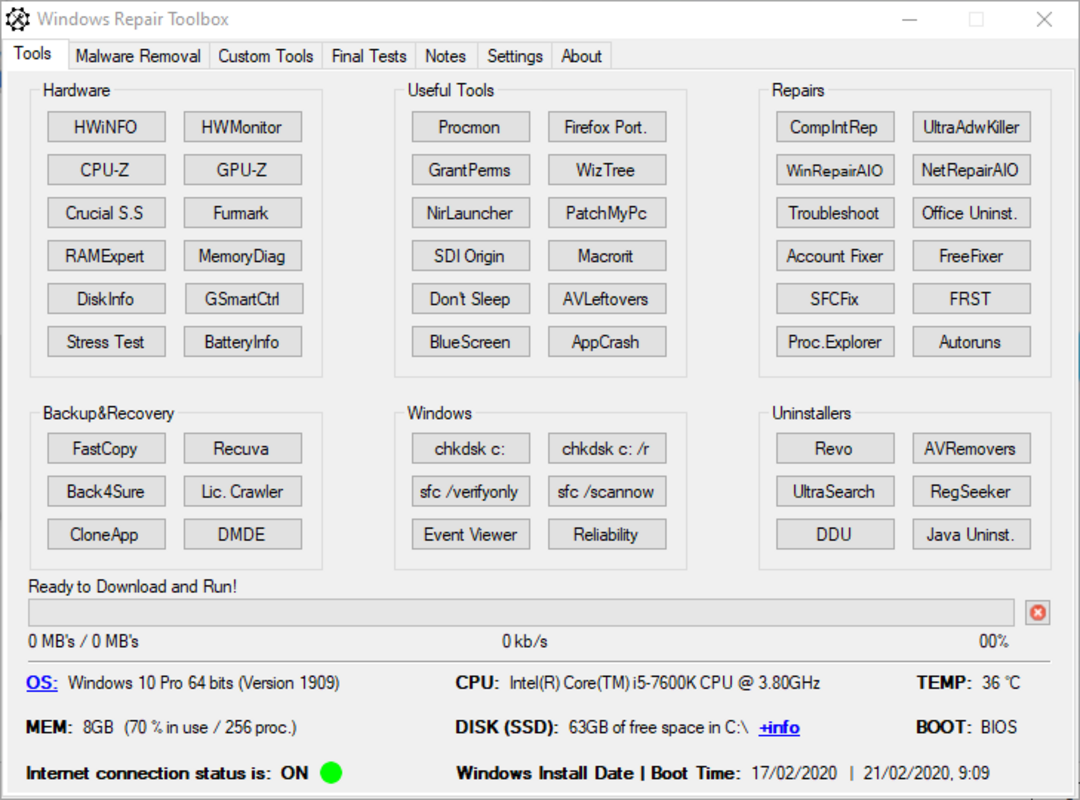
- Comprehensive Repair Options – The app offers a wide selection of repair tools covering hardware diagnostics, installed program management, backup restoration, system component repair, and uninstaller functions. This allows users to address various system issues without switching between multiple applications.
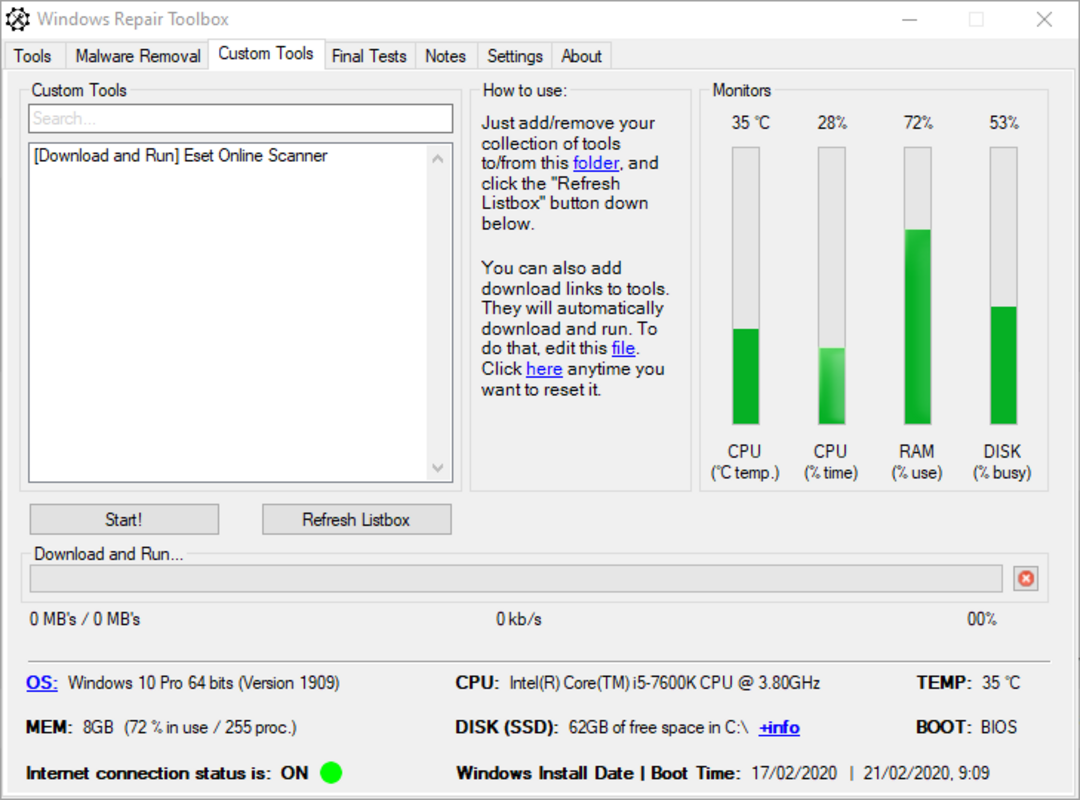
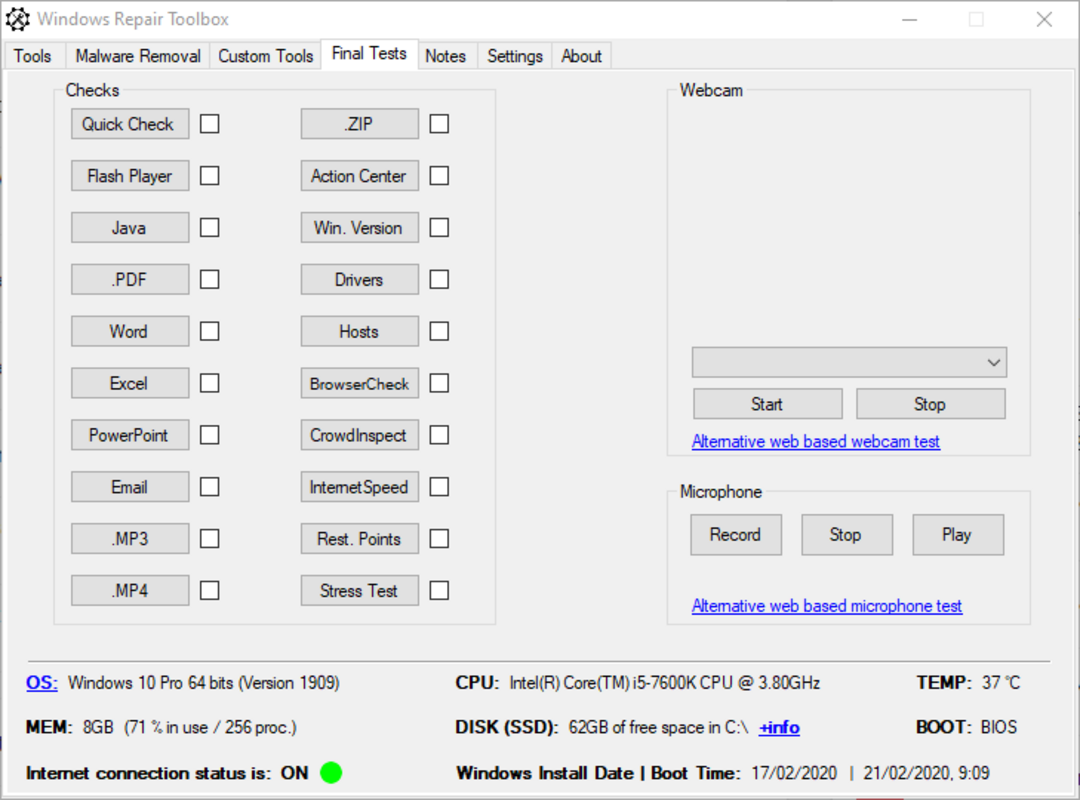
- Intuitive Interface – The program presents repair functions in a clear, organized layout. Users can access desired tools with a single click, enabling a streamlined troubleshooting process that requires minimal technical knowledge.
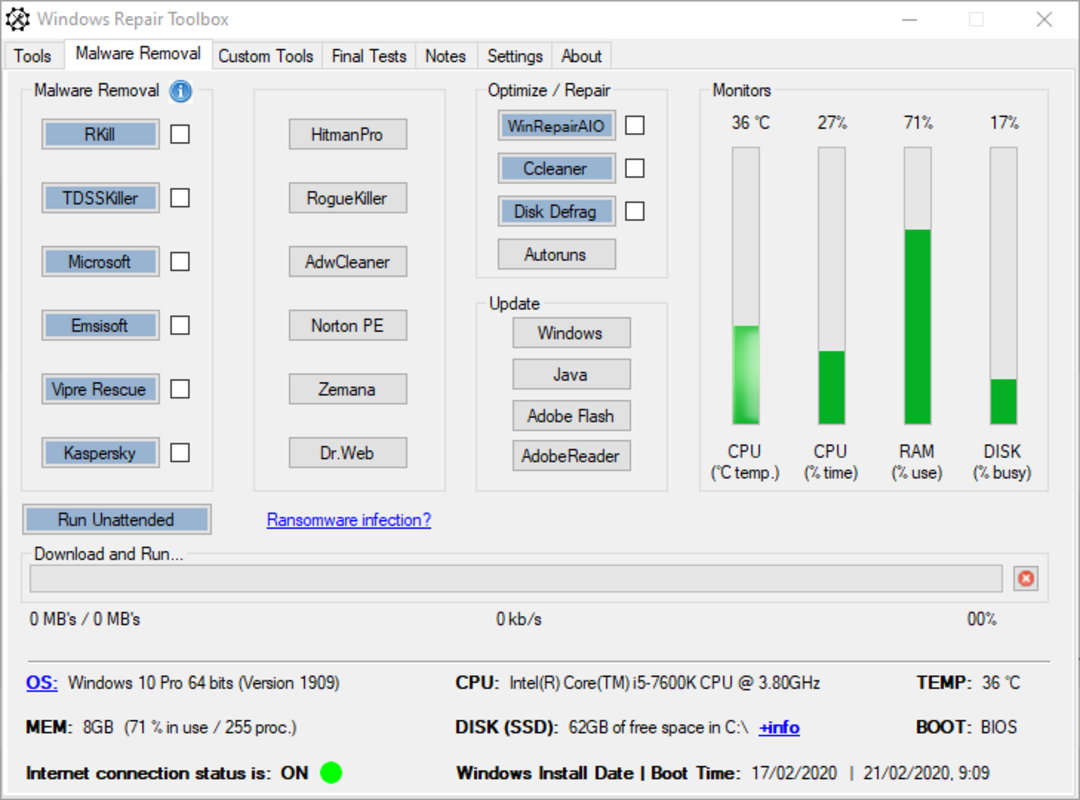
- Malware Elimination – A dedicated section enables users to scan and remove potential malware threats. This feature enhances system security by helping to eliminate malicious software that could compromise performance or data integrity.
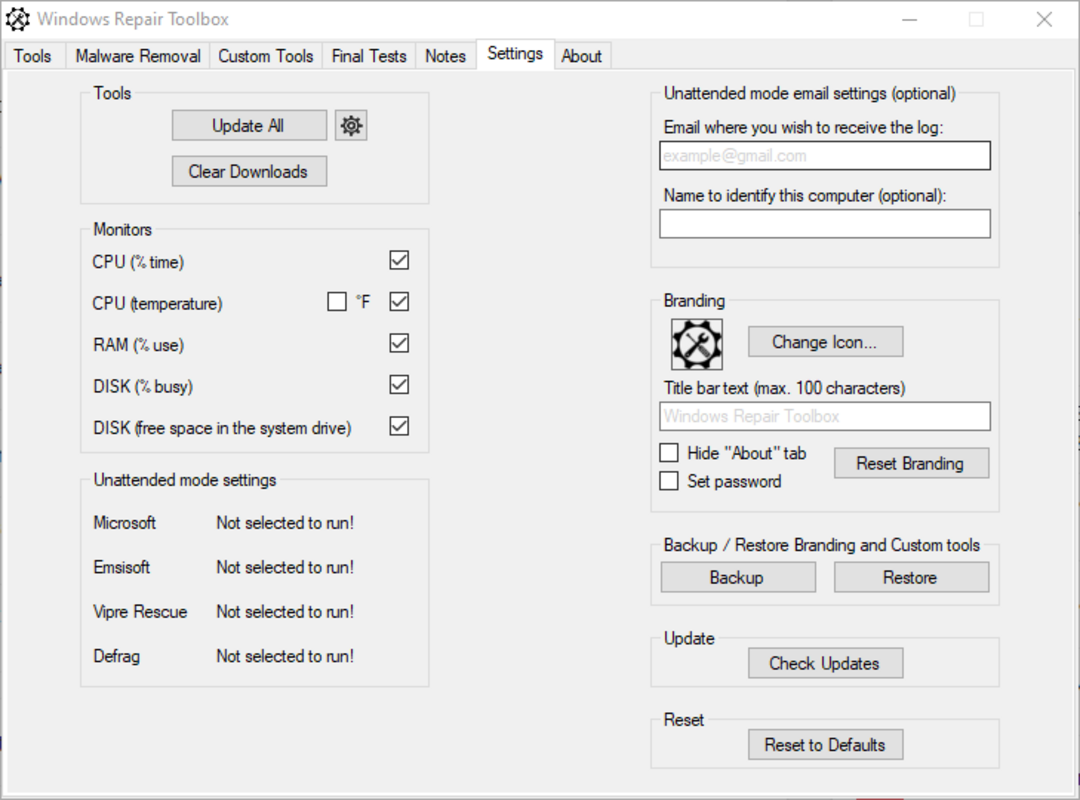
- Detailed System Information – Windows Repair Toolbox provides real-time data on system specifications, including OS version, installed memory, CPU usage, and hardware temperature. This insight supports informed decisions about system maintenance and optimization.
- Performance Optimization – Through automated and manual repair processes, the app helps maintain optimal system performance. It focuses on reducing lag, improving boot times, and ensuring software stability across different usage scenarios.
For example, a user experiencing slow startup times can use the repair tools to clean temporary files and reset system configurations. Similarly, someone encountering software installation failures may use the repair functions to fix registry issues or corrupted components. These practical applications highlight the app’s value in everyday computing environments.
Interface, UX & Performance
The user interface of Windows Repair Toolbox is designed with clarity and simplicity in mind. Tools are grouped into logical categories and displayed in a clean, uncluttered layout. Navigation is straightforward, with minimal clicks required to initiate repairs, contributing to a positive user experience.
Visual elements are functional rather than decorative, focusing on usability. The app avoids unnecessary animations or complex menus, which helps maintain responsiveness and reduces cognitive load. This design philosophy supports quick access to core features, especially for users who may not be familiar with technical troubleshooting.
Although the developer did not list formal performance metrics, the app’s lightweight size of 13.5 MB suggests efficient resource usage. It is likely optimized for minimal impact on system performance during operation. The application appears stable during typical use, with no reported issues related to crashes or freezes.
Responsiveness is maintained across different device configurations, though specific hardware requirements were not disclosed. The app runs smoothly on standard Windows systems, indicating broad compatibility. Stability is a key strength, with consistent behavior observed during repair tasks.
Platform Compatibility & Technical Requirements
Windows Repair Toolbox is designed for the Windows operating system. The app is available in version 2.0.2 and has a file size of 13.5 MB. It is offered at no cost to users, making it accessible to a wide audience.
The developer did not specify minimum OS requirements or compatibility details beyond the platform. As such, users should verify that their system meets the necessary conditions before installation. Compatibility information was not fully disclosed, so it is recommended to check official sources for updated system requirements.
Pros and Cons
Pros
- Free to download and use, offering accessible system repair tools.
- Comprehensive suite of functions covering multiple repair areas.
- Intuitive interface that simplifies complex troubleshooting tasks.
- Lightweight design with minimal system resource consumption.
- Includes real-time system diagnostics and performance insights.
Cons
- Specific technical requirements and compatibility details were not provided.
- Malware elimination feature may require additional scanning tools for full protection.
- Limited information about update frequency or long-term support.
- No official documentation or user guides were referenced.
- Functionality is limited to minor system failures; not designed for deep system recovery.
FAQ
Is Windows Repair Toolbox safe to install?
Yes, the app is free and designed to help users fix minor system issues. As with any utility, it is recommended to download it from official sources to ensure security.
Can I use Windows Repair Toolbox on older versions of Windows?
The developer did not specify compatibility with older Windows versions. Users should check official sources for confirmed system requirements.
Does the app require internet access?
While the app may function offline, certain features like malware database updates could require internet connectivity.
How often should I run the repair tools?
There is no fixed schedule. Users can run the tools as needed when experiencing performance issues or system errors.
Is Windows Repair Toolbox available for macOS or Linux?
Based on the provided information, the app is only available for Windows. No versions for other operating systems were listed.
Final Thoughts
Windows Repair Toolbox stands out as a practical and accessible utility for users seeking to maintain their Windows systems without relying on complex tools. Its combination of repair options, system diagnostics, and a user-friendly interface makes it a valuable asset for everyday computing. While it does not replace advanced system recovery tools, it effectively handles minor issues that commonly affect performance and stability.
Individuals who want a lightweight, free solution to troubleshoot common problems will find this app particularly beneficial. It empowers users to take control of their system health with minimal effort and technical knowledge.
For those looking to improve system performance, fix software glitches, or enhance security through basic repairs, Windows Repair Toolbox delivers real value. Its focus on simplicity, efficiency, and functionality aligns well with the needs of modern users.
Download Windows Repair Toolbox now
Guides & Tutorials
How to install Windows Repair Toolbox
- Click the Download button above.
- Once redirected, accept the terms and click Install.
- Wait for the Windows Repair Toolbox download to finish on your device.
How to use Windows Repair Toolbox
This software is primarily used for its core features described above. Open the app after installation to explore its capabilities.
User Reviews
No reviews yet. Be the first to share your experience.
You may also like
more
Que no te pillen¡
About !Que no te pillen¡Reviewed by Jason A. BilbreyShow MoreShow Less

3D Combat Zone
About 3D Combat ZoneOriginally released in 1983, 3D Combat Zone immerses players...

666: El día del portal
About 666: El día del portalOn June 6, 2006, Agent P. Stone uncovers a sinister...

80 in 1 Best Flash games
About 80 in 1 Best Flash games 80 in 1 Best Flash games is a collection of 80 fl...

ABYSS SEEKERーーWhat Do You See Deep in The Abyss
About ABYSS SEEKERーーWhat Do You See Deep in The AbyssIn ABYSS SEEKER, players...

ACA NEOGEO THE KING OF FIGHTERS 2002 for Windows
About ACA NEOGEO THE KING OF FIGHTERS 2002 for WindowsTHE KING OF FIGHTERS 2002,...